14-DAY SECURITY SETUP FOR ONE PRODUCTION VPS

Secure who can access your VPS and what is open to the internet - without getting locked out.

Over 14 days, we secure administrator access, document what is reachable from the internet, and agree which access, services and protections belong on the server. If something important changes later, you receive a clear Telegram alert. You keep the access setup, the alerts and a Before/After report.

$700 per server that passes the safety check · Most core work in 3–5 business days · Final report and handoff on day 14

WHAT BECOMES CLEAR TO THE OWNER

See who can access your server, what is open to the internet, and when something important changes.

During the first 14 days, we record the expected administrator access, public services and server protections. This becomes the agreed reference point. Later, an unexpected login, key, port, service or failed protection can trigger a clear Telegram alert.

PUBLIC PORT & SERVICE WATCH

Know which parts of your server are open to the internet—and what is using them.

A public port is a door from the internet into your server. Your website needs some doors open; an accidental one can expose an admin panel, database or test service.

We record which ports should be public, which service and system user should be behind each one, and who approved it.

  1. 01
    Define what belongs

    Which ports should be public, what should use them and who approved them.

  2. 02
    Watch the whole picture

    A new public port, a new firewall rule, broader administrator access or a different service or user behind an expected port.

  3. 03
    Send a clear Telegram alert

    What changed, why it matters and what to check first.

EXPECTEDWebsite traffic on port 443nginx / approved
same port number
CHANGEDPort 443 now runs something elsepython3 / root / unexpected
Why this matters

Attackers automatically probe public services. A new port—or a different process behind an approved port—creates a new place to attack. Seeing the change quickly lets you confirm it, restrict it or close it.

An alert means “review this change.” It is not proof of an attack.
A change is a reason to check—not proof of an attack.

Expected changes can be approved. Unexpected access, keys, listeners or control failures remain visible for review.

01

Access and administrators

  • Who signed in, when and from where
  • Whether the login matched an approved user, key and source
  • Whether a new administrator, SSH key or access setting appeared
02

Controls we verify

  • We check the configured firewall posture against the approved state
  • We verify the Fail2Ban SSH jail and its log source
  • We check local security logging, update signals and reboot requirements
HIGH-SIGNAL TELEGRAM ALERTS

When something important changes, you get the signal—not a wall of logs.

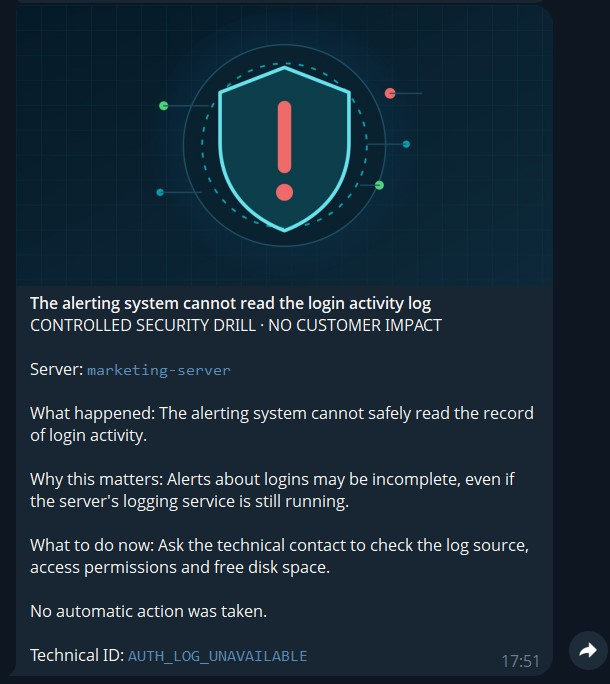
Each alert shows what changed, why it matters and what to check first. Related repeats are grouped, and each supported signal is enabled only after we record the expected server state.

Alerts can cover unexpected administrator access, new SSH keys, public-port or service changes, firewall changes, and failures in Fail2Ban or security logging.

Example of a VPS Secure Base Telegram alert showing an unexpected service change on marketing-server Open the full alert capture

Example Telegram alert

APPROVEDtcp/443nginx · public
DRIFTtcp/443python3 replaces nginx
What changedExact signal and evidence
Why it mattersPlain-language context
First actionWhat to check next
WHY A SCRIPT IS NOT ENOUGH

Security tools are easy to install. Changing a live server safely is the hard part.

A checklist does not know which services your business needs, which ports were opened on purpose, which update requires a maintenance window, or how to recover if an access change goes wrong.

A generic hardening run

  • Treats every server the same
  • Cannot separate needed services from accidental exposure
  • May change access before recovery is proven

VPS Secure Base

  • Starts with your real workload and recovery path
  • Changes only what is approved, in controlled stages
  • Checks production after each stage and records the result
PRIVATE ACCESS WITHOUT BLIND LOCKOUT

Keep administrator access private—with a verified way back in.

We restrict public SSH only after private WireGuard access and emergency access through the hosting provider have both been tested.

1

Private everyday access

WireGuard and private key-only SSH for the owner or administrator.

2

Owner-approved recovery access

An approved owner or trusted Telegram ID can open key-only SSH for one exact public IP for 15 or 30 minutes.

3

Hosting-provider recovery

Emergency console or rescue access through the hosting provider remains available for rollback or repair.

How temporary recovery access works
01

The requester uses /access and enters one exact public IPv4 or IPv6 address plus a reason.

02

The approved owner or trusted decision-maker receives the request in a private Telegram chat.

Open 15 minOpen 30 minDeny
03

The server opens key-only SSH only for that IP, records the grant and closes the firewall rule automatically on expiry or revoke.

The local cleanup timer still closes the rule if Telegram becomes unavailable. Expiry blocks new connections; an already-open SSH session is handled separately if immediate termination is required.

If the production host cannot safely run WireGuard, we agree a compatible external VPN design before changing public SSH. Temporary recovery access always remains exact-IP, key-only and time-limited.

A BOUNDED 14-DAY ENGAGEMENT

Inspect, secure, observe and hand off.

01BEFORE DAY 1

Confirm fit and recovery

We confirm that the server passes the safety check, verify emergency access through the hosting provider, record a reliable check that the website or app still works, and agree the written scope. A 50% deposit reserves the engagement.

02DAYS 1–5

Secure in controlled stages

Private access, what is reachable from the internet, server protections, logging and supported alerts—with a production check after each stage.

03DAYS 5–14

Learn the server’s normal behavior

We review access, ports, services and logs across the 14-day window and tune obvious noise.

04DAY 14

Hand over the evidence

Final report, update/reboot plan, risks that remain and proof that our operator access was removed.

FIXED SCOPE · CLEAR OUTPUT

What is included—and what you receive.

Included for one server that passes the safety check

  • Read-only safety check and verified recovery path
  • Key-only SSH and administrator review
  • Private administrator access for a compatible server
  • Host-safe firewall and review of what is reachable from the internet
  • Fail2Ban SSH and security-update policy
  • Persistent local security logging
  • High-signal Telegram alerts after setup checks
  • 14-day security log review and update/reboot plan

Application, database, container changes and risky reboots are handled only under a separately approved scope.

Evidence your team keeps

  1. 01Before/After Security Report
  2. 02Administrator Access Register
  3. 03Approved Public-Port Register
  4. 0414-Day Security Snapshot
  5. 05Update & Reboot Plan
  6. 06Risks That Remain, Rollback & Proof of Access Removal
Selected preview · 3 of 8 report pages

Proof you can read, keep and hand to your team.

The report does not pretend that everything is fixed. It shows what was completed, what remains, why it remains and what should happen next.

  • Executive verdict and Before → After evidence
  • Private-access and public-service records
  • Alert examples and 14-day security snapshot
  • Safe update/reboot plan and risks that remain
  • Proof of operator access removal and handoff
Discuss your VPS
Secure Base OverviewSanitized evidence (after)
Sample
evidence.afterread-only sample

SSH configuration

Root login
Disabled
Password auth
Disabled
Admin access
Key-only

Firewall posture

Backend
Identified
Host rules
Reviewed
Provider edge
Documented

Protection & logging

Fail2Ban SSH
Running
Auth source
Readable
Local logs
Persistent

Updates & alerts

Security policy
Configured
Reboot window
Documented
Telegram alert
Delivered
FIT BEFORE CHANGE

A strong fit for a production VPS without a security engineer.

Best fit

  • Founder or CTO without a dedicated security engineer
  • Ubuntu or supported Debian production VPS that passes the safety check
  • Administrator SSH plus emergency access through the hosting provider
  • Usable snapshot/recovery path and a reliable check that the website or app still works
  • Owner or trusted technical approver

Needs a different scope

  • Active compromise or suspected incident
  • No independent emergency access or recovery path
  • Unsupported, EOL or broken host
  • Application, Docker, database or network redesign
  • Expectation of zero downtime, 24/7 SOC or guaranteed delivery
Portrait of Denis Sedelnikov, VPS Secure Base operator
WHO WORKS ON YOUR SERVER

Security work performed by a real operator—not an unattended script.

Sedelnikov Denis Aleksandrovich

Server Security & Access Control Specialist

Independent service provider based in Indonesia

We work under a written scope, use revocable access, never ask you to send a private SSH key or root password, and remove our operator access at handoff.

01Written scope and approvals
02Revocable operator access
03Proof our access was removed
View Denis on LinkedIn
ONE FIXED-SCOPE ENGAGEMENT

Clear price. No required management contract.

VPS Secure Base engagement

$700per server after the safety check

A fixed-scope 14-day engagement covering private administrator access, a review of what is reachable from the internet, server-level protections, high-signal alerts, a 14-day security log review and a clear handoff.

50% after written scope approval to reserve the engagement50%
Check My VPS Fit

Corporate Admin VPN

+$150

Private WireGuard access for up to seven named employees to selected internal services and website admin panels on one compatible server. Each person receives an individual connection that can be tested and revoked. Application authentication and hardening remain separate.

Additional separately scoped work

Quoted separately

Docker Exposure Cleanup · Backup Restore Drill · Safe Update/Reboot Window · Provider Firewall Alignment · Additional Server.

FAQ

Questions you should ask before anyone changes production.

Could this take my website or application offline?

Every change is planned and checked in stages. We verify recovery, record a reliable check that the website or app still works, and prepare rollback. Zero downtime is not promised; risky updates and reboots require a separately approved maintenance window.

Could I get locked out of my own server?

Private WireGuard access and emergency access through the hosting provider are tested before public SSH is restricted. The agreed recovery model can also include owner-approved, exact-IP Telegram access for 15 or 30 minutes.

I already use UFW and Fail2Ban. What am I paying for?

You are not paying for two free packages. We review who can access the server and what is reachable from the internet, preserve recovery, apply only approved changes, check production after each stage, analyze 14 days of behavior, and leave evidence and a next-step plan.

What happens during the first 14 days?

We record the expected administrator access, public ports, services and protections; review real deployments and restarts; tune obvious noise; and agree the expected server state. This is a bounded observation period, not 24/7 monitoring.

Does a Telegram alert mean my server was hacked?

No. It means the expected server state changed or a high-risk signal appeared. The alert shows what changed and what to check first; the change may be expected, accidental or malicious.

Who investigates a Telegram alert?

The owner or trusted administrator receives the signal, local evidence and recommended first action. Continuous investigation, incident response and 24/7 SOC coverage are not included.

What stays in place after day 14?

Your private access, local security logging and configured alerts remain on the server. We deliver the final report and remove our own VPN access and SSH key. Ongoing review and response are separate.

Do you need my root password or private SSH key?

No. We use a revocable public SSH key and never ask you to send private keys or server passwords.

What if the server uses Docker?

We include Docker-published ports in the exposure review. Container or network redesign is quoted separately when it cannot be changed safely inside the fixed scope.

What if the server may already be compromised?

We stop routine setup work and recommend incident response or recovery. Hardening is not a safe substitute for investigating an active incident.

Can the Corporate Admin VPN protect an admin panel?

Yes, where a selected endpoint can be safely restricted on the same compatible server. Up to seven named employees receive individual WireGuard access. This does not replace application authentication, authorization, updates or security hardening.

What if the server fails the safety check?

We stop before unsafe changes, explain the blocker and do not proceed outside the agreed scope. Any reschedule, reduced scope or cancellation is confirmed in writing.
NEXT STEP · NO PAYMENT OR SERVER ACCESS YET

See whether your VPS fits the $700 scope.

No credentials are needed. Tell us how the server is used and what worries you. We will check whether it fits the fixed scope and contact you through your preferred channel before any payment or server access.

Your answers go directly to Denis and are never sent to Google Analytics.

Preferred contact Required

No payment and no server access at this stage.

If the form is temporarily unavailable, contact Denis through the verified LinkedIn profile.

Check My VPS Fit